
Search is no longer just about keywords. AI-powered engines are rewriting the rules — and if your WordPress website isn’t optimised for the new paradigm, you’re already losing ground to competitors who are.
Whether you’re a business owner, digital marketer, or web developer in the UAE or Australia, this guide gives you a complete, actionable roadmap across the three pillars of modern search optimisation: GEO, AEO, and AIO.
📌 What You’ll Learn in This Guide
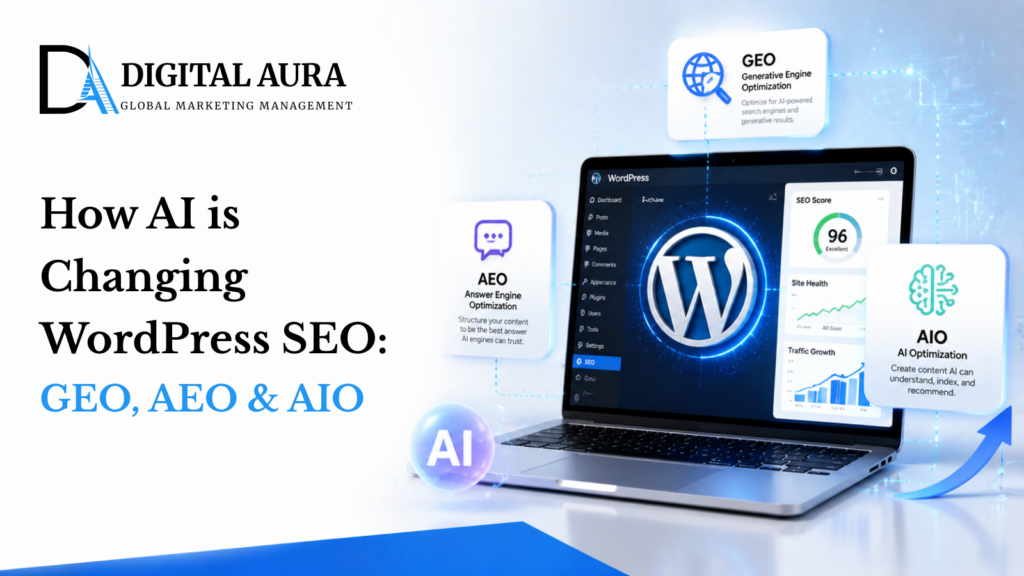
GEO (Generative Engine Optimisation) — rank in local and AI-driven search results. AEO (Answer Engine Optimisation) — get featured in voice search and AI answer boxes. AIO (AI Optimisation) — become a trusted source cited by ChatGPT, Perplexity, and Google SGE. By the end, you’ll have a step-by-step implementation plan for your WordPress site.
GEO
Generative Engine Optimisation — dominate local and location-based AI search results
AEO
Answer Engine Optimisation — win featured snippets, voice search and AI answer boxes
AIO
AI Optimisation — become a cited source in ChatGPT, Perplexity and Google SGE
Let’s break each one down into concrete WordPress actions you can implement today.
1. GEO — Generative Engine Optimisation (Local Search)
GEO is about making your WordPress site discoverable in local, AI-driven search environments — where tools like Google’s AI Overviews, ChatGPT with search, and Perplexity pull location-based answers from trusted sources. Here’s your implementation plan:
Incorporate Geo-Specific Keywords Strategically
Use location modifiers throughout your content — examples: “SEO agency Dubai”, “WordPress web design Melbourne”, “digital marketing Abu Dhabi”. Place these in page titles, H1/H2 tags, meta descriptions, image ALT text, and anchor text in internal links.
Fully Optimise Your Google Business Profile
Claim and verify your listing, then ensure NAP (Name, Address, Phone) consistency across your website, directories, and social platforms. Upload photos, respond to reviews, post regular updates, and complete the Q&A section — all signals AI engines use to validate local authority.
Implement Local Business Schema Markup
Use Rank Math or Schema Pro to add LocalBusiness schema to your WordPress site. Include your business name, address, opening hours, geo-coordinates, review data, and service areas. This structured data is the primary way AI engines understand and verify your local relevance.
Create Dedicated Location Landing Pages
For each suburb or city you serve, build a unique landing page. Include local testimonials, case studies from that area, an embedded Google Map, suburb-specific content, and a clear call to action. Thin, templated pages won’t work — each page needs genuine local value.
Build Local Citations in High-Authority Directories
Submit your business to trusted regional directories — Yellow Pages, TrueLocal, Hotfrog, StartLocal, Yelp AU (AU) or equivalent UAE directories. Maintain exact NAP consistency across every listing to build the trust signals that generative engines rely on.
AI tools like Google’s AI Overviews cross-reference multiple data points before surfacing a local business. The more consistently your NAP, schema, and content align across your site and external directories, the stronger your local generative search presence.
2. AEO — Answer Engine Optimisation (Voice & Featured Snippets)
AEO ensures your WordPress content is structured to be selected by AI assistants (Siri, Alexa, Google Assistant) and featured snippet algorithms. These systems look for direct, well-structured, concise answers. Here’s how to optimise:
Structure Content for Featured Snippets
Use question-based headings (H2 or H3), bullet points, and numbered lists. Keep your direct answer within 40–60 words under each subheading — this is the ideal length for featured snippet extraction. Answer the question immediately; don’t bury it in paragraphs.
Implement Structured Data Markup
Add relevant schema.org types to your pages: FAQPage schema for FAQ sections, HowTo schema for step-by-step guides, and QAPage schema for community Q&A content. Recommended plugins: Rank Math, Schema Pro, Yoast SEO Premium.
Adopt Natural Language & Long-Tail Keywords
Optimise for how people speak, not just how they type. Examples: “How do I improve my WordPress SEO in Dubai?” or “What are the best caching plugins for WordPress?” Your headings and subheadings should mirror these natural language queries exactly.
Write Voice Search-Friendly Content
Target a Year 8 reading level. Use short sentences. Answer the core query within the first 100 words of each section. Maintain a conversational tone throughout — voice search devices read content aloud, so it must sound natural when spoken.
Include Contextual CTAs After Answer Sections
Guide users to the next step after every answer. Examples: “Want help implementing this on your WordPress site? Contact our team.“ This improves engagement signals that AEO algorithms factor into selection.
Add an FAQ section to every key service or blog page using FAQPage schema. Target 5–8 questions that mirror real searches. Keep each answer under 60 words. This single tactic can significantly increase your featured snippet appearances within weeks.
3. AIO — AI Optimisation (Be Cited by AI Engines)
AIO is the newest — and most rapidly evolving — frontier of search. Tools like ChatGPT, Google’s AI Overviews, and Perplexity.ai summarise the web in real time, pulling from sources they deem authoritative, well-structured, and trustworthy. Here’s how your WordPress site becomes one of those sources:
Publish First-Party, Authoritative Content
AI engines prioritise experience and originality. Write from genuine expertise. Include client quotes, proprietary case studies, original data, and real-world insights that can’t be found on competing pages. Generic, aggregated content rarely gets cited.
Optimise HTML Semantics for AI Readability
Use one H1 tag per page for your title. Structure H2 and H3 tags logically. Use proper paragraph tags, ordered/unordered lists, and a TL;DR or summary section at the top of long posts. Clean semantic HTML is how AI parsers understand and categorise your content.
Enrich Every Page with Meta & Open Graph Tags
Ensure every page has a meta title, meta description, Open Graph tags (og:title, og:description, og:image), and Twitter Cards. These tags are read by AI scrapers and social platforms alike — they define how your content is understood and shared across the wider web.
Ensure Full Search Engine Indexation
AI platforms like Perplexity and You.com draw their content from Google and Bing indexes. Submit your XML sitemap to both. Check for crawl errors in Google Search Console regularly. Pages that aren’t indexed by search engines won’t be discovered by AI engines either.
Build Topical Authority with Content Clusters
Create a hub-and-spoke architecture on your WordPress site. A pillar page (e.g., “Complete Guide to WordPress SEO for UAE Businesses”) links to cluster articles (e.g., “Best WordPress Caching Plugins”, “How to Structure a Blog Post for AI”). Dense internal linking signals deep topical expertise to AI engines.
Monitor & Audit Your AI Search Presence
Actively test how AI tools represent your brand. Ask ChatGPT: “Who are the best WordPress web design agencies in Dubai?” Search your services on Perplexity and Google AI Overviews. Identify gaps in how you’re described, then adjust your content to position yourself as the authoritative source.
AI engines don’t share a public ranking algorithm the way Google does. However, the consistent signals across all AI platforms are: authoritative authorship, semantic HTML structure, factual accuracy, and external citations of your brand. Focus on these fundamentals.
WordPress Plugins & Tools to Support GEO, AEO & AIO
The right toolstack makes implementation significantly faster. Here are the WordPress-specific tools we recommend for each pillar:
Technical Baseline: Before any of the above tactics will fully work, your site must be mobile-first, speed-optimised, technically sound (no crawl errors, correct canonical tags), and built with clean semantic HTML. These are table stakes for AI discoverability.
GEO vs AEO vs AIO: At a Glance
| Factor | GEO | AEO | AIO |
|---|---|---|---|
| Primary Goal | Local search visibility | Featured snippets & voice | AI citation & sourcing |
| Key Signal | NAP consistency, local schema | Structured Q&A content | Authority, originality, semantics |
| Main Platforms | Google Maps, AI Overviews | Google, Siri, Alexa | ChatGPT, Perplexity, SGE |
| Priority Plugin | Rank Math (Local SEO) | Rank Math / Schema Pro | Yoast / Rank Math |
| Time to Impact | 4–12 weeks | 2–8 weeks | Ongoing / accumulative |
| Difficulty Level | Medium | Low–Medium | Medium–High |
Frequently Asked Questions
What is GEO in SEO, and how is it different from traditional local SEO?
Traditional local SEO focuses on ranking in Google’s map pack and organic results. GEO extends this to AI-driven search environments — ensuring your business is discoverable and accurately represented in AI-generated summaries and answers that include location context. It requires consistent structured data, NAP signals, and location-specific content.
How does AEO differ from standard SEO?
Standard SEO targets keyword rankings in traditional search results. AEO specifically optimises content to be selected as a direct answer — in featured snippets, voice assistant responses, and AI answer boxes. It requires a different content structure: short, direct answers under question-based headings with schema markup.
Can a small WordPress site realistically be cited by ChatGPT or Perplexity?
Yes — but it requires consistency. Smaller sites gain AI citations by building deep topical authority in a niche, earning external backlinks from credible sources, maintaining clean semantic HTML, and publishing original, factual content that can’t be found elsewhere. Authority is relative to your topic, not your site size.
Which WordPress plugin is best for schema markup?
Rank Math is our top recommendation — it handles LocalBusiness, FAQPage, HowTo, Article, and many other schema types natively, with a clean UI. Schema Pro is a strong alternative for users who want more granular control. Yoast SEO Premium covers the basics well if you’re already using it.
How long does it take to see results from GEO, AEO and AIO optimisation?
AEO changes (featured snippets) can appear within 2–8 weeks if your content is well-structured. GEO improvements typically take 4–12 weeks as Google recrawls and re-evaluates your local signals. AIO is the most gradual — it’s an accumulative process of building authority that compounds over months, not weeks.
Do I need a developer to implement these changes?
Most GEO and AEO changes can be made through WordPress plugins without developer skills. AIO implementation is largely content and structure work that any site owner can do. Technical items — like fixing crawl errors, optimising Core Web Vitals, or customising schema JSON-LD — may benefit from developer involvement.
Final Thoughts: Future-Proof Your WordPress Site Now
GEO, AEO, and AIO aren’t buzzwords or passing trends — they reflect a genuine, structural shift in how search works. Google’s own AI Overviews now appear on the majority of commercial searches. ChatGPT reached 300 million users in 2025. Perplexity is now a default search alternative for millions of professionals.
The businesses that optimise for these paradigms now will have a compounding advantage over those who wait.
- Implement local schema and citation consistency for GEO
- Restructure your content with Q&A formatting and FAQPage schema for AEO
- Publish original, authoritative content with clean HTML semantics for AIO
- Ensure your WordPress site is fast, mobile-first, and technically clean
- Monitor your AI presence on ChatGPT, Perplexity, and Google AI Overviews regularly
The opportunity is significant — and it’s open to businesses of every size. Your WordPress site can become a go-to source for AI engines, not just traditional search, if you start building the right signals today.
Need Help Implementing This on Your Site?
The Digital Aura team works with businesses across Dubai, the UAE, and Australia to implement GEO, AEO, and AIO strategies on WordPress — from technical schema setup to full content architecture redesigns.
We combine deep WordPress expertise with AI search knowledge to help your site rank not just on Google, but inside the AI tools your customers are already using.